



What is Xerox Germany?

Xerox Deutschland is a subsidiary of Xerox Corporation and is one of the leading providers of printing and document management solutions in Germany. With a strong presence in the German market, the company offers a wide range of products and services tailored to the needs of businesses of all sizes and industries.

Products and Services

  1. Print solutions:
  • Xerox Germany sells a variety of printing systems, including multifunction printers, production printers, and specialized printing solutions to increase business efficiency.
  1. Managed Print Services (MPS):
  • The company offers comprehensive Managed Print Services, which include an analysis of printing needs, the implementation of optimal printing solutions, and ongoing support. The goal is to lower operating costs and reduce CO2 emissions.
  1. Digital Document Management:
  • Solutions for document digitization and the optimization of business processes are also in focus. This includes products for workflow-based efficiency enhancement and the improvement of information availability.
  1. Customer support and services:
  • Xerox Germany places great importance on customer support and offers comprehensive maintenance and support services to ensure the fast and efficient operation of its printing systems.

Commitment to innovation

Xerox Germany continuously invests in research and development to offer innovative solutions that meet the constantly changing demands of the business world. Through partnerships with other technology providers and close collaboration with customers, Xerox strives to further optimize and adapt its products and services in the future.

Sustainability

Another important aspect of Xerox Germany is its commitment to sustainability. The company pursues eco-friendly practices and offers solutions that help businesses reduce their environmental footprints, whether through energy-saving technologies or recycling programs for consumables.

Xerox Germany thus positions itself as a competent and innovative partner for companies looking for first-class printing and document management solutions.
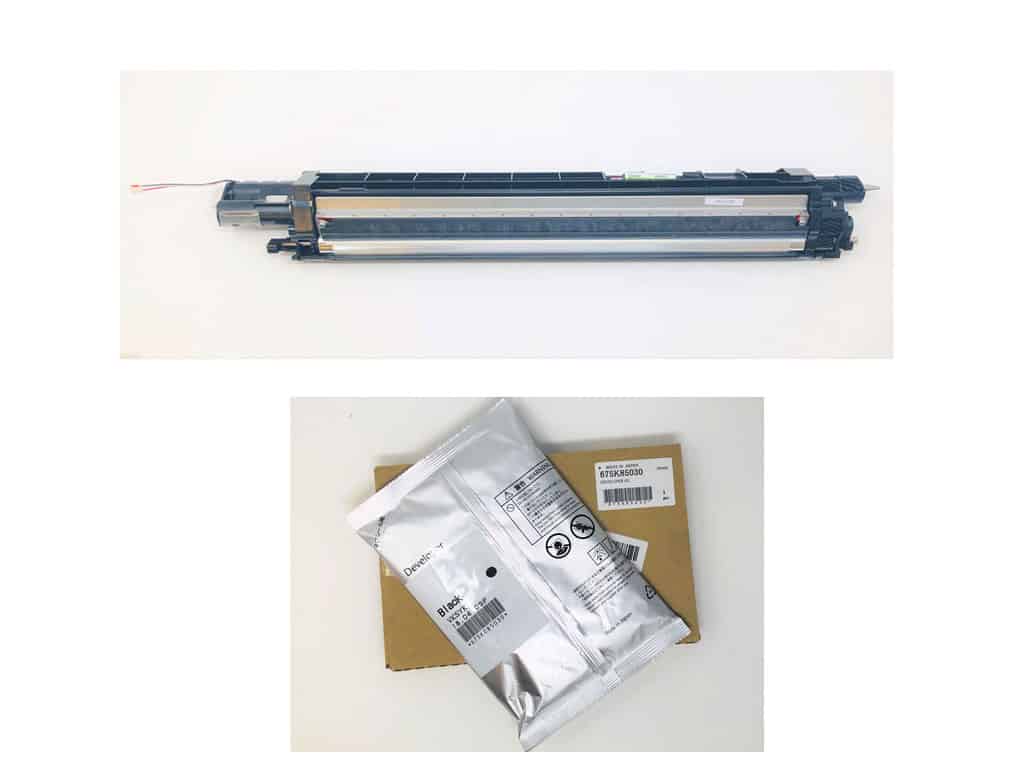
What is the developer unit of a Xerox printer?

A developer unit of a Xerox printer is a central component in the printing process, responsible for creating the print image. It contains the development mechanism that transfers the toner powder onto the paper.

The developer unit works in conjunction with the photoconductor drum, transferring the toner to the areas that have been exposed by the laser light. This process is crucial for the quality and precision of the printed documents. Depending on the model, the developer unit can be installed as a separately replaceable component (only in Xerox A3 printing systems, where the developer itself must also be replaced) or as part of a disposable toner cartridge. The developer unit in a disposable toner cartridge is therefore automatically replaced every time the toner is replaced. Some Xerox A4 printing systems feature permanent developer units; these are designed for the entire life of the printer and generally do not need to be replaced.

Regular maintenance and the timely replacement of the developer unit are of great importance for the smooth operation of the printer and to ensure high-quality print results.

Art. Nr.: 607K07290 Xerox Developer Unit Black C7000

Image: Developer unit with Developer box CMYK Xerox C8030 (top) and Developer black Xerox 7530 7830 C8030 (below)

Should I purchase a Xerox color printer or a black and white printer for myself or my business?

The decision of whether you should acquire a Xerox color printer or a black-and-white printer depends on several factors that match your specific requirements. Here are some considerations that can help you with your decision:

  1. Printing needsIf your printing requirements frequently include color materials such as presentations, marketing materials, or graphics, a color printer is the better choice. A black-and-white printer, on the other hand, is suitable if your documents are predominantly text-based.
  2. CostsColor printers generally have higher purchase and operating costs due to more expensive color toner and potentially more frequent media changes. Black-and-white printers are more cost-effective to operate, especially at high print volumes.
  3. Print speedCheck the printing speeds of both options. Black and white printers often offer faster printing times for large text documents.
  4. FunctionalityIf you need additional features such as scanning or copying, many multifunction printers are available in both variants. Compare the available models to find the right device for your needs.
  5. Print qualityConsider what quality is required for your applications. Color printers offer higher quality for image-intensive documents, while black-and-white printers are sufficient for clear, readable text.

In summary, the choice between a Xerox color printer and a black-and-white printer depends on your specific application area. Consider your printing requirements, budget constraints, and desired print quality to make an informed decision.

Signs of Xerox printer fuser unit problems

The fuser unit of a Xerox printer plays a crucial role in the printing process. There are several signs that may indicate the fuser unit is defective:

  1. Smudges on the paperIf you frequently notice smudges or streaks on the paper when printing, this may indicate insufficient toner fixing.
  2. Irregular print qualityFrequent occurrences of blurry or incomplete printouts may indicate an issue with the fuser unit.
  3. Paper jamFrequent paper jams, especially in the output area, can be caused by a defective fusing unit that does not properly complete the printing process.
  4. Increased noise levelUnusual noises during the printing process, especially during fusing, can indicate mechanical problems in the fuser unit.
  5. OverheatingIf the fusing unit gets excessively hot, it can indicate a defect or malfunction that can impair both the print quality and the safety of the device.
  6. Printing defects in the drying processIf the pressure is not fixed properly and the toner flakes off or wipes off easily, this is a clear sign of a defective fusing unit.

If one or more of these signs occur, it is advisable to have the fuser unit checked by a professional or replaced if necessary. Timely maintenance can extend the lifespan of your Xerox printing system and ensure high print quality.

Image: Xerox Fuser 220 V Phaser 3610 and WorkCentre 3615 and WorkCentre 3655

Signs of Developer Unit Problems on Xerox Printers

The developer unit of a Xerox printer plays a crucial role in the printing process. Signs of a defect may include:

  1. loss of print qualityReduced print quality, such as fuzzy or blurred printouts, may indicate a faulty developer unit.
  2. Color distortionsIrregular or incorrect color reproduction, including color spots or streaks, often indicates problems in the developer unit.
  3. Streaks or smudges on the print mediaIf prints show streaks or smudges, this could indicate buildup or contamination in the developer unit.
  4. Common error messagesRegular error messages on the printer display indicating developer or toner issues are also a warning sign.
  5. Unusual noisesIf unusual noises, such as cracking or grinding, occur during the printing process, this could indicate mechanical difficulties within the developer unit.
  6. Toner consumptionExcessive toner consumption may indicate an inefficient developer unit that is not using the toner effectively.

It is recommended to consult a specialist upon identifying these problems to have the developer unit professionally inspected or replaced if necessary.

Signs of a problem with the drum unit on Xerox printers

The imaging drum is a crucial element in the printing technology of a Xerox printer. There are several signs that can indicate a defective imaging drum:

  1. Print qualityIf you notice blurred, fuzzy, or streaky printouts, this could indicate a worn or defective image drum. In particular, you should look out for vertical lines or spots on the paper.
  2. Color deviationsSevere color fading or color shifts can also be signs of a defective imaging drum. This is particularly relevant in color printers, where faulty prints can be attributed to any of the colors used.
  3. Frequent paper jamsIf there are frequent paper jams, especially in conjunction with printing problems, this can be an indication of a malfunctioning photoconductor drum.
  4. Scratches or damageVisible damage to the imaging drum, such as scratches or cracks, can significantly impair print quality.
  5. NoisesUnusual noises during the printing process, such as scraping or knocking noises, can indicate internal problems that might also affect the imaging drum.
  6. Warning messagesMany modern Xerox printing systems are equipped with diagnostic functions that display warning messages when the image drum needs to be replaced. Pay attention to such messages on your printer's display.

If one or more of these signs appear, it is advisable to check the imaging drum and replace it if necessary to ensure print quality and prevent further damage to the printing system.

Problems with Xerox printers

Xerox printers can experience various issues that can affect print quality or functionality. Below are some common problems along with potential solutions:

  1. Print quality is insufficient
    • ProblemBlurring, banding, or uneven colors may occur.
    • SolutionCheck the toner level and replace empty or nearly empty cartridges if necessary. Also check the print quality settings.
  2. Paper jam
    • ProblemPaper is stuck in the printer and is preventing the printing process.
    • SolutionOpen the printer covers and carefully remove the jammed paper. Make sure to leave no paper scraps behind. Check the input tray for bent or damp paper.
  3. Printer cannot be found
    • ProblemThe printer is not recognized on the network or cannot be accessed.
    • SolutionMake sure the printer is properly connected to the network. Check the network settings and configure the IP address manually if necessary. Perform a printer test to verify the connection.
  4. Slow print speed
    • ProblemThe printing process is taking longer than expected.
    • SolutionCheck the printer settings and make sure that the correct print format and appropriate mode are selected. Switching from „Draft“ to „Normal“ or „High“ may possibly improve the print speed.
  5. Scan or copy problems
    • ProblemScanning or copying errors can also occur.
    • SolutionCheck the scanner unit and scanner glass for dirt or scratches. Make sure the documents are loaded correctly and the scan or copy settings are correct.

Through proactive maintenance and regular checks, many of these issues can be avoided. In the event of persistent or complex problems, a specialized technician should be consulted to ensure that the printer operates efficiently and reliably.

Official Xerox Support Page: https://www.support.xerox.com/de-de

What is the fuser unit in a Xerox printer?

The fuser unit of a Xerox printer plays a crucial role in the printing process. It is responsible for permanently bonding the toner particles applied to the paper to the paper by applying heat and pressure. Here are some key points about the fuser unit and its importance:

Function of the fuser unit:

  • Toner fixingBy heating the toner particles, they are melted and bonded to the paper surface. This typically happens between two heated rollers that guide the printed sheet through the fuser unit.
  • Prevent BlurringA properly functioning fusing unit ensures that the printed materials are fixed in place and prevents them from smudging or peeling.

Function of the fixing unit:

  • Print qualityThe fuser unit has a direct impact on the quality of the print results. A faulty fuser unit can lead to blurred prints or insufficient toner adhesion.
  • Print product durabilityDue to the correct fixing, the durability and resistance of the printed products against external influences such as moisture and friction increase.
  • Cost-effectivenessA well-functioning fuser unit minimizes paper waste and other costs that can be associated with faulty prints.

Overall, the fuser unit is an essential component of a Xerox printer, which is of great importance for ensuring print quality and efficiency. It is recommended to maintain it regularly and replace it if necessary to ensure the continuous high performance of the printing system.

Fuser Unit Xerox C8030/C8035 Art. No.:604K62220/604K62230

Image: Fuser Unit Xerox 6510/6515

How does a Xerox printer work?

A Xerox printer consists of several essential components that work together to produce high-quality print results. The main components are:

  1. Print shopThe core of a printer that controls the printing process. It includes:
    • Exposure unit: The Exposure unit is responsible for transferring the image or text onto the printing drum.
    • Drum unitTransfers the printed image to the paper.
    • Development unitMixes the toner powder and prepares it for transfer to the drum.
    • Fuser unitMelts the toner powder onto the paper to create permanent printed images.
  1. Toner cartridgesContains the toner powder required for the printing process. Various types of toner are available in Xerox printing systems, including eco-friendly options.
  2. Paper feedThe mechanisms that transport the paper to the printing unit. This also includes various paper trays that can handle different paper sizes and types.
  3. Control unitThe computer or processor part of the printer that controls all functions and processes print jobs. This includes the connections to computers or networks.
  4. User interfaceDisplays and buttons that enable users to control the printer and adjust settings.

The printing process in a Xerox printer works as follows:

  1. Data transmissionThe print job is sent from a computer to the printer via a network connection.
  2. Image processingThe control unit prepares the print image by converting the information into a format understandable by the printer.
  3. Transfer to the drumThe image drum is electrostatically charged, and the prepared image is from the Exposure unit transfer to the drum.
  4. DevelopmentThe toner powder from the developer unit is applied to the drum and adheres to the charged areas of the image.
  5. PressureThe printing unit draws in the print medium and transfers the toner image.
  6. FixationThe fixing unit melts the toner powder and ensures that it adheres to the paper through heat and pressure. .
  7. OutputThe finished printout will be available in the output tray.

Through these precise steps, a Xerox printer enables efficient, fast, and high-quality printing that meets the demands of businesses across various industries.

Image: Xerox B225

When does the drum unit of a Xerox printer need to be replaced?

The exchange of a Exposure unit In a Xerox printer, replacement is necessary when certain signs appear that indicate wear and tear or malfunctions. Here are the key points that necessitate a replacement:

  1. Image quality issues: If prints exhibit blurriness, banding, spots, or color saturation issues, it may be due to a faulty Exposure unit hints.
  2. Reduced print speedA slower printing speed can indicate an inefficient Exposure unit indicate that it may no longer be able to perform the required laser exposures quickly and precisely.
  3. Permanent color variationsIf prints consistently show color deviations or uneven color tones, this may indicate a deterioration of the Exposure unit note.
  4. Wear and tear instructionsInstalled operating hours or page count parameters (e.g., in the printer's maintenance menu) can provide information on whether the Exposure unit has reached its lifespan. There are often manufacturer recommendations for replacement every 50,000 to 150,000 pages, depending on the model and usage.
  5. Printer signalsMany printers, including Xerox systems, display warning messages or error codes when the Exposure unit must be replaced. These messages should be taken seriously.
  6. Physical damageVisible defects on the Exposure unit, Cracks or other damage also require replacement, as they can significantly affect print quality.

The regular inspection and maintenance of the Exposure unit is crucial for ensuring consistently high print quality and operational efficiency. In cases of uncertainty, it is advisable to consult a specialist or Xerox technical support.